
Google launched Gemini 3 on November 18, 2025, calling it the most intelligent model in the Gemini family so far. The launch centered on Gemini 3 Pro, released in preview, and a stronger reasoning mode called Gemini 3 Deep Think. Google put the new model into the Gemini app, Search, AI Studio, Vertex AI and a new developer platform on the same day. This guide explains what changed from Gemini 2.5 Pro, what the benchmark numbers mean, and what it costs to use.
Gemini 3 at a glance: what changed
Gemini 3 arrived on November 18, 2025 as a new generation of Google’s flagship AI model, with Gemini 3 Pro in preview and a stronger reasoning mode called Gemini 3 Deep Think. It reached the Gemini app, AI Mode in Search, AI Studio, Vertex AI and Google Antigravity on launch day, with a 1 million token context window.

The launch was a clean break from how Google had shipped earlier Gemini models. Gemini 2.5 Pro had rolled out to products over weeks, but Gemini 3 went into Search on day one. Sundar Pichai, chief executive of Google and Alphabet, wrote in the launch post that Gemini 3 combines the capabilities of earlier generations so people can bring any idea to life. Demis Hassabis, chief executive of Google DeepMind, and Koray Kavukcuoglu, chief AI architect at Google, co-wrote the technical part of the announcement.
For users, the practical change is that the Gemini app now runs on a stronger model by default, and paid subscribers get higher limits. In the app, Gemini 3 Pro is the model behind the Thinking option in the model selector. Google also redesigned the Gemini app at launch, with a cleaner look and a My Stuff folder for images, videos and reports. The free year of Google AI Pro for college students in the United States was extended at the same time, so students could use Gemini 3 without paying. The model also reached Google hardware quickly, including the Google Pixel 10 series, where the Gemini app is built into the phone.
Gemini 3 Pro and Deep Think
Gemini 3 Pro is the main model of the Gemini 3 family, released in preview on November 18, 2025. Gemini 3 Deep Think is a higher compute reasoning mode that pushes performance further on hard problems. Deep Think went to safety testers first, with access for Google AI Ultra subscribers to follow in the coming weeks.

Gemini 3 Pro is the model most people will meet. Google describes it as the best model in the world for multimodal understanding and its most powerful model yet for agentic work and vibe coding, which means building apps by describing them in plain words. It handles text, images, video, audio and code in one workflow, and it gives shorter and more direct answers than Gemini 2.5 Pro, with less flattery. Google says it tells users what they need to hear, not just what they want to hear.
Deep Think is a different setting, not a separate product. It spends more compute on a problem before answering, which helps on science questions, hard math and tasks that need several steps of reasoning. Google gave it to safety testers first because the extra capability needed more checks before a wider release. Google AI Ultra subscribers were next in line. If you only need quick answers, summaries and everyday writing help, Gemini 3 Pro is the right choice. Deep Think fits the questions where a wrong answer would cost real time.
Reasoning and benchmarks Google reported
Google reported that Gemini 3 Pro tops the LMArena leaderboard with 1501 Elo, the first model above 1500. It also reported 37.5 percent on Humanity’s Last Exam without tools, 91.9 percent on GPQA Diamond and 81 percent on MMMU-Pro. All of these figures come from Google, so they are the company case, not independent results.

Benchmarks are tests, not a verdict on everyday use, so read the numbers with that in mind. LMArena ranks models by how people vote in blind comparisons, so a 1501 Elo score shows that people preferred Gemini 3 Pro answers, not that every answer was correct. Humanity’s Last Exam is a set of doctoral level questions, and 37.5 percent without tools is high for that test, while GPQA Diamond at 91.9 percent covers difficult science questions. MMMU-Pro at 81 percent tests reasoning across images and text together.
Deep Think scored higher on the same tests in Google’s testing. It reached 41.0 percent on Humanity’s Last Exam without tools and 93.8 percent on GPQA Diamond. It also scored 45.1 percent on ARC-AGI-2 with code execution, a test of solving new problems rather than repeating learned patterns. Google also reported 72.1 percent on SimpleQA Verified, a test of factual accuracy, and 23.4 percent on MathArena Apex, a math benchmark. The pattern across the table is the same: Gemini 3 Pro leads the tests Google chose to publish, and Deep Think leads Gemini 3 Pro. Independent testing takes weeks to catch up with a launch, so treat the figures as a starting point and judge the model on your own work. Rival models have their own strong results too, as our guide to OpenAI GPT-5 shows, so a single table never settles which model fits your work.
Multimodal understanding and the 1 million token window
Gemini 3 Pro is natively multimodal, which means it takes in text, images, video, audio and code together instead of handling each type separately. It also has a 1 million token context window, so it can work with very long documents, long videos and large sets of files in one conversation.
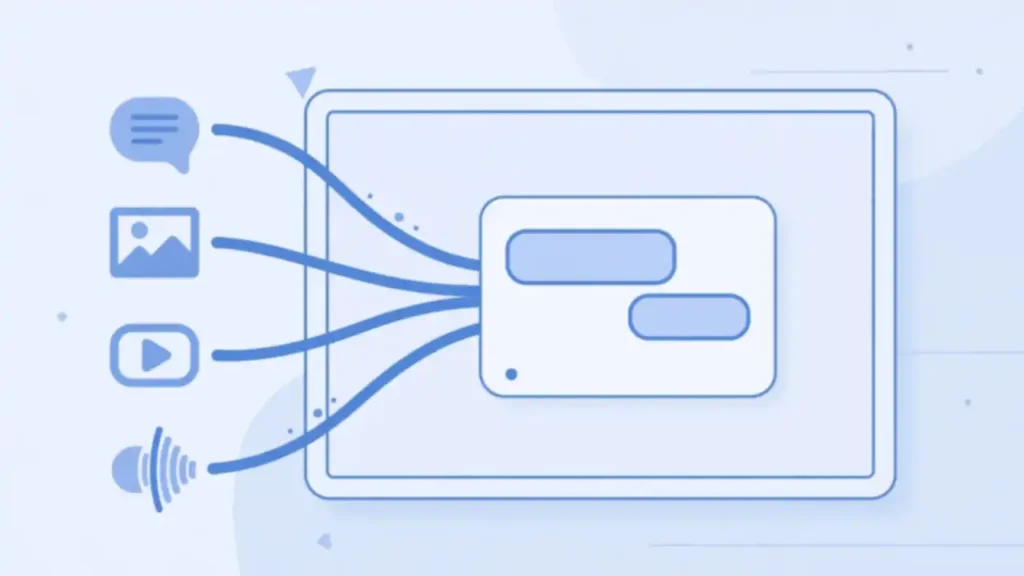
Multimodal input changes what you can ask for. Google gives the example of handwritten family recipes in different languages, which Gemini 3 can read, translate and turn into a shareable cookbook. You can also give it academic papers, long video lectures or tutorials and ask it to build interactive flashcards or visual explanations from them. It can watch a video of a sports game and point out where your form needs work, then draft a training plan. The model scored 87.6 percent on Video-MMMU in Google’s testing, a benchmark for reasoning about video.
The 1 million token window matters for long work. A token is a small chunk of text, and one million tokens is roughly 750,000 words, which is enough for several books at once. That means you can load a full research paper set, a long contract or hours of meeting transcripts and ask questions across all of it without splitting the material into pieces. The limit is not free of trade offs. Long inputs cost more through the API and can slow replies, so use the full window for work that needs it, such as comparing documents, and keep short questions short.
Generative interfaces in the Gemini app
Gemini 3 can design the interface for its own answer, a capability Google calls generative interfaces. Two early versions, visual layout and dynamic view, rolled out in the Gemini app on launch day. Visual layout builds a magazine style page with photos and modules, while dynamic view codes a custom interactive screen in real time.

The idea is that the answer should fit the question. Ask Gemini to plan a three day trip to Rome, and visual layout can return an itinerary you can explore, with photos and sections you can tap to change. Ask it to explain a gallery of paintings with life context for each piece, and dynamic view can build an interactive screen with images, text and controls that match that exact request. The interface is generated when you ask, so two people asking different questions get different screens.
Google rolled out the two versions as experiments, so you may see only one of them at first. The change matters because it moves the Gemini app away from a plain chat list toward answers that look like small apps. It also raises a practical point. A generated interface can look polished while the facts inside it are wrong, so check dates, prices and names in the answer before you act on them, just as you would with a plain text reply. Google is bringing the same idea to other products, including shopping in Chrome, where enhanced autofill with Gemini fills in details from your Gmail.
Gemini Agent and everyday tasks
Gemini Agent is an experimental feature in the Gemini app that carries out multi-step tasks for the user. It connects to Google apps such as Gmail and Calendar, and it can organize an inbox, draft replies for approval, manage reminders and research a booking. It launched for Google AI Ultra subscribers in the United States first.

Gemini Agent is built on Project Mariner, Google’s earlier research on agents that use a browser, and it runs on Gemini 3 reasoning. You give it a goal in plain words, and it breaks the goal into steps, uses tools such as Deep Research, Canvas, Gmail and Calendar, and browses the web when it needs live facts. Google gives the example of asking it to research and book a mid-size SUV under 80 dollars a day, using flight details from your email. The agent finds the flight, compares rental prices and prepares the booking.
Control stays with the user. Gemini Agent is designed to ask for confirmation before actions that matter, such as making a purchase or sending a message, and you can take over at any time. That matters because an agent that can read your email and act on it can also make a mistake with real cost. Try it first on a low risk task, such as organizing an inbox or drafting replies, and check each step before you let it handle bookings or payments on its own. Access is limited by plan and region, so check whether Gemini Agent is available on your account before you plan work around it.
Google Antigravity and coding with Gemini 3
Google Antigravity is a new agentic development platform that launched with Gemini 3 on November 18, 2025. It gives coding agents direct access to the editor, terminal and browser, so they can plan, write and test software end to end. Gemini 3 is the model that powers it.

Antigravity changes the shape of an AI coding tool. In a normal AI code editor, the assistant suggests code and you run it. In Antigravity, agents sit on their own surface in the editor and work on several tasks at once, checking their own code as they go. Google showed an agent building a flight tracker app from start to finish, planning the work, writing the code and validating it in the browser. The platform also bundles the Gemini 2.5 Computer Use model for browser control and the Nano Banana image editing model.
Gemini 3 coding scores, as reported by Google, are strong. It reached 76.2 percent on SWE-bench Verified, a test based on real software engineering tasks, and 54.2 percent on Terminal-Bench 2.0, which tests tool use through a terminal. It also topped the WebDev Arena leaderboard with 1487 Elo, which ranks models on building web interfaces. Developers can also use Gemini 3 in AI Studio, Vertex AI, Gemini CLI and third party tools such as Cursor, GitHub, JetBrains, Manus and Replit. The code still needs testing, because a model that writes more code in one pass can also ship more errors in one pass.
Gemini 3 in Search and AI Mode
Gemini 3 reached Google Search on launch day, the first time Google shipped a new Gemini model in Search on day one. It powers AI Mode in Search for Google AI Pro and Ultra subscribers, with deeper reasoning and new generative experiences such as visual layouts and interactive tools built on the fly.

AI Mode is the part of Search where you ask a full question instead of typing keywords. With Gemini 3 behind it, AI Mode can reason through a harder question and return an answer that includes a visual layout or an interactive tool, such as a comparison table or a simulation, generated for that query. Google says the model is better at reading the intent behind a request, so it needs less prompting to give a useful answer.
The change is easy to miss because Search still looks like Search. The difference is in the answers. A question about a product, a trip or a research topic can now return a structured page instead of a list of links. That is useful when you want a direct answer, and it is a reason to check the sources the answer cites, because an AI Mode reply can blend facts from several pages. The Gemini app remains the place for longer conversations, file uploads and coding, while AI Mode fits quick research inside Search. Google’s search products have changed many times over the years, and our history of Google policies and updates puts this launch in that longer context.
Plans, API pricing and what changed since launch
Gemini 3 Pro is available to everyone in the Gemini app, with higher limits for Google AI Pro and Ultra subscribers. Developers pay per token through the Gemini API, where the current third generation Pro model is listed at 2 dollars per million input tokens and 12 dollars per million output tokens for prompts up to 200,000 tokens.

The free tier is the cheapest way to try Gemini 3 Pro. Open the Gemini app, select Thinking in the model selector, and you can use it with a daily limit. Google AI Pro and Ultra subscribers get higher limits, plus access to Gemini 3 Pro in AI Mode in Search and to features such as Deep Research and Gemini Agent. Prices for the consumer plans change from time to time, so check the current Google AI plans page before you subscribe.
Developers should note the API rates on Google’s official pricing page. The Gemini 3.1 Pro Preview model, the current third generation Pro model in the API, costs 2 dollars per million input tokens and 12 dollars per million output tokens for prompts up to 200,000 tokens, rising to 4 dollars and 18 dollars above that size. Google has since made Gemini 4 Argon its flagship reasoning model in the API, so Gemini 3 is no longer the newest generation. The launch facts in this article still stand: Gemini 3 Pro was the model that brought this level of reasoning to the Gemini app and to Search on day one.
Frequently asked questions
These are the questions readers ask most about Google Gemini 3. Each answer below comes from the launch announcement, the Gemini app update or Google’s pricing pages, and the benchmark numbers are labeled as Google reported because they come from the company.

When did Google launch Gemini 3?
Google launched Gemini 3 on November 18, 2025. Gemini 3 Pro shipped in preview the same day in the Gemini app, AI Mode in Search, AI Studio, Vertex AI and Google Antigravity. Gemini 3 Deep Think went to safety testers first, with access for Google AI Ultra subscribers to follow.
What is Gemini 3 Pro?
Gemini 3 Pro is the main model of the Gemini 3 family. Google describes it as its most intelligent model, with state of the art reasoning and the best multimodal understanding in the Gemini line. It handles text, images, video, audio and code, and it has a 1 million token context window.
What is Gemini 3 Deep Think?
Deep Think is a higher compute reasoning mode for Gemini 3 that spends more time on hard problems before answering. In Google’s testing it scored 41.0 percent on Humanity’s Last Exam and 93.8 percent on GPQA Diamond, above Gemini 3 Pro. It went to safety testers first, then to Google AI Ultra subscribers.
Is Gemini 3 free to use?
Yes, Gemini 3 Pro is available to everyone in the Gemini app with usage limits. Google AI Pro and Ultra subscribers get higher limits and access to Gemini 3 Pro in AI Mode in Search. Check Google’s current AI plans page for prices, because plan prices change.
How much does the Gemini 3 API cost?
The current third generation Pro model in the Gemini API, Gemini 3.1 Pro Preview, costs 2 dollars per million input tokens and 12 dollars per million output tokens for prompts up to 200,000 tokens. Above that size the rates rise to 4 dollars and 18 dollars. See Google’s official API pricing page for the current figures.
What is Gemini Agent?
Gemini Agent is an experimental feature in the Gemini app that carries out multi-step tasks, such as organizing an inbox, drafting replies and researching a booking. It connects to Google apps including Gmail and Calendar, asks for confirmation before purchases or messages, and launched first for Google AI Ultra subscribers in the United States.
Is Gemini 3 better than GPT-5?
On the benchmarks Google published, Gemini 3 Pro leads on several tests, with 1501 Elo on LMArena and 76.2 percent on SWE-bench Verified, against 74.9 percent for GPT-5 on the same coding test as reported by OpenAI. Benchmarks are vendor reported and measure different things, so the better choice depends on the task. Our guide to OpenAI GPT-5 covers the GPT-5 launch in the same detail.
Sources
- Google, A new era of intelligence with Gemini 3: https://blog.google/products-and-platforms/products/gemini/gemini-3/
- Google, Gemini 3 brings upgraded smarts to the Gemini app: https://blog.google/products-and-platforms/products/gemini/gemini-3-gemini-app/
- MacRumors, Google Launches More Intelligent Gemini 3 Model: https://www.macrumors.com/2025/11/18/google-gemini-3/
- Google, Gemini Developer API pricing: https://ai.google.dev/gemini-api/docs/pricing
- Google, Google AI plans: https://one.google.com/about/google-ai-plans